Iterations and check-ins
How the build loop repeats, when it pauses for you, and what stops it.
A run is a loop. Each pass through Requirements → Planning → Development → Integration → QA → Feedback is one iteration, and each iteration ends with a score. This page explains when the loop pauses for you and what ends it.
The rule: only you or a limit ends a run#
The score threshold does not stop a run on its own. A run ends in one of three ways:
- You accept the build at a check-in.
- Max iterations is reached. This is the hard stop.
- You stop at a Max cost check-in, or cancel the run.
However it ends, the Summary Generator then writes the README and the run completes. Cancelling is the one exception: a cancelled run stops where it is.
Check-ins#
A check-in is a card that pauses the run between iterations and asks what to do next.
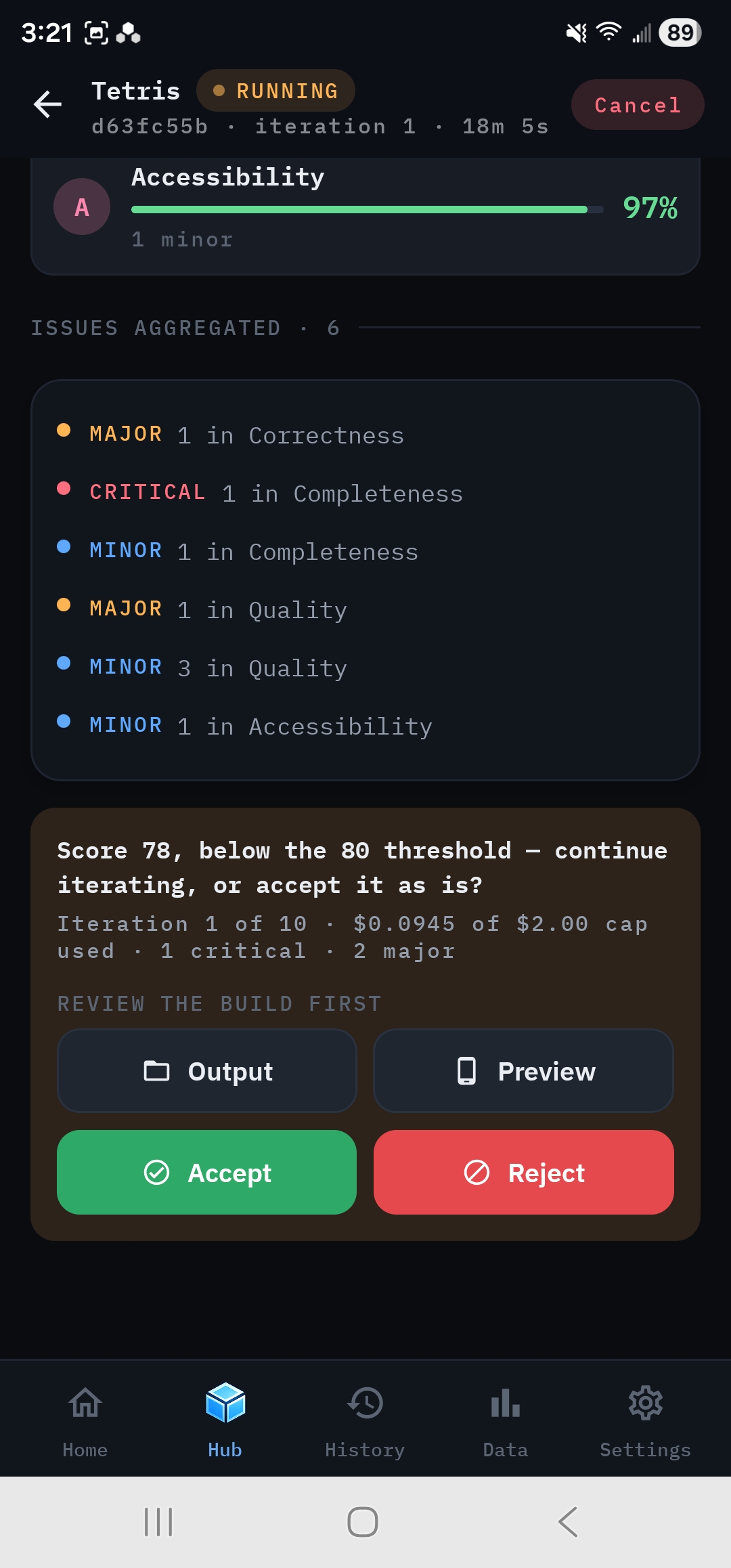
It shows:
- the score against your threshold, for example Score 78, below the 80 threshold: continue iterating, or accept it as is?
- the iteration number out of your maximum, spend against your cost cap if one is set, and open critical and major issues.
Under Review the build first, Output and Preview let you look at the actual files and try the app before you decide. Then choose:
- Stops the loop. The Summary Generator writes the README and the run completes.
- Runs another iteration. The developers fix what QA flagged.
- Opens a text box, then runs another iteration with your note passed to the swarm.
Supervised vs Autorun#
The Autorun switch decides how often the swarm checks in.
- Off (Supervised), the default: the swarm checks in at the end of every iteration.
- On (Unattended): the swarm keeps iterating without checking in while the score is below your threshold. Once the score reaches the threshold it checks in, and it checks in again after every later iteration. If the score then drops back below the threshold, it goes quiet again.
Autorun appears at the top of New Run → Configuration and again on the live dashboard, where you can flip it mid-run. A mid-run change takes effect at the next iteration boundary. When you start a run with Autorun on, the app asks you to confirm first. You can tick Don't show again.
Max iterations#
The maximum number of iterations in a run: default 10, allowed range 1 to 50. When the last iteration finishes, the loop ends even if you haven't accepted, and the Summary is written.
Max cost#
Max cost is a predictive spend limit, set in $0.25 steps and Off by default.
Before starting each iteration after the first, the swarm takes the most expensive iteration so far and adds that to what's already been spent. If the total could go over your cap, it checks in before starting the iteration. You can stop there, or let it run anyway. It asks again before every iteration that would breach.
What Max cost doesn't do:
- It never interrupts agents partway through an iteration.
- It can't check before the first iteration, because there's no estimate yet.
- It isn't a hard guarantee. One iteration can cost more than the worst one before it.
For a firm ceiling, also set a spending limit in your provider's billing console.
Notes#
You can talk to the swarm while it works. Add a note is on the live dashboard, and in App Preview during a live run. It's also on the check-in card as Continue with a note.
- A note is queued for the next iteration boundary. It never interrupts the phase in progress.
- When the next iteration starts, the Analyst reads your notes and updates the acceptance criteria if needed. The Project Manager then plans work to address them.
- Notes are saved with the run, show on the scorecard timeline, and are exported as
docs/notes.md.
Good notes are concrete: "The board should be centered on desktop", "Add a move counter under the grid", "Clicking a filled cell still changes it."
Continuing a finished run#
A completed, cancelled or failed run can be picked up again with Run next iteration. It continues at the next iteration number with your change request. Each reopened session has its own iteration and cost caps. See Continue a finished run.